 seolounge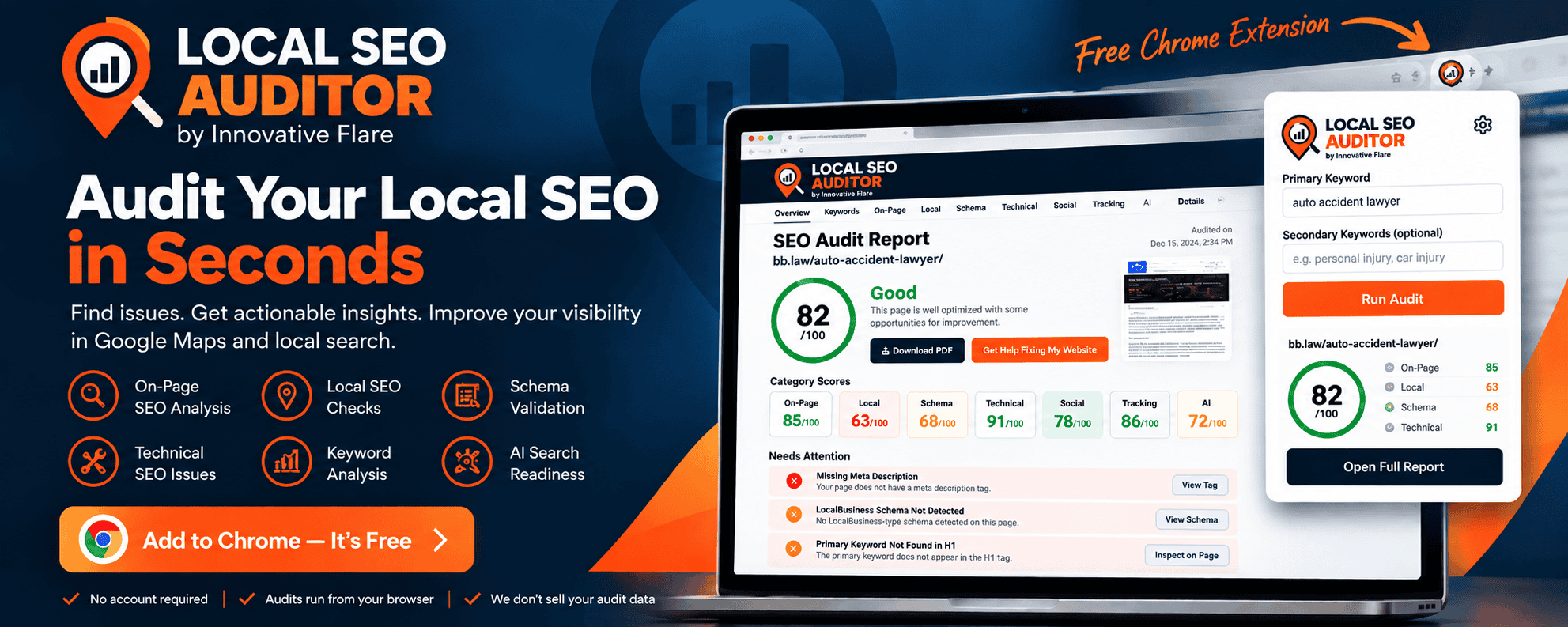
FREE CHROME EXTENSION
Local SEO Auditor: Find SEO Problems on Any Web Page in Seconds
Local SEO Auditor by Innovative Flare is a free Chrome extension that analyzes the page you’re viewing for local SEO, on-page SEO, keyword targeting, schema markup, technical issues, social signals, tracking technology, and AI search readiness.
Enter your target keyword, run the audit, and get a clear SEO score with actionable recommendations showing what is working, what needs attention, and what you can improve.
No account required. Audits run from your browser. We don’t sell your audit data.
A Faster Way to Audit Local SEO
SEO problems are not always obvious when you look at a website. A page can look great while missing important signals that help search engines understand what the page is about, where the business operates, and which searches the page should be relevant for.
Local SEO Auditor gives business owners, marketers, web developers, and SEO professionals a quick way to inspect those signals without jumping between multiple tools.
Open a page, enter the primary keyword you want to evaluate, and Local SEO Auditor analyzes the current page directly from Chrome.
What Does Local SEO Auditor Check?
The extension evaluates multiple areas of a page instead of reducing SEO to a single title tag or keyword check.
Keyword Analysis
See how well your target keyword and related terms are represented across important page elements.
- SEO title keyword usage
- Meta description keyword usage
- H1 keyword usage
- URL keyword usage
- Opening content
- H2 and heading coverage
- Secondary keyword coverage
- Image ALT text
- Keyword overuse signals
On-Page SEO
Review important elements that help search engines and visitors understand your page.
- SEO title
- Meta description
- H1 usage
- Heading structure
- Content signals
- Image ALT attributes
- Internal links
- External links
- Page language
Local SEO Signals
Check whether the page provides useful signals about the business and the geographic market it serves.
- Business information
- Phone numbers
- Click-to-call links
- Location terminology
- Google Maps links
- Local intent signals
- Structured business information
Schema Markup
Detect JSON-LD structured data and understand which schema types search engines can find on the page.
- Organization
- LocalBusiness
- ProfessionalService
- WebSite
- WebPage
- Service
- Article and BlogPosting
- BreadcrumbList
- Person
- Other detected schema types
Technical SEO
Identify technical signals and potential problems that may affect how a page is crawled, indexed, or navigated.
- HTTPS
- Canonical tags
- Meta robots directives
- Noindex detection
- Robots.txt
- XML sitemap detection
- Internal link response checks
- Redirecting internal links
- Viewport configuration
- HTML language
Social & Entity Signals
See whether the website connects its brand with important social and entity information.
- YouTube
- X
- TikTok
- Open Graph metadata
- sameAs entity references
Tracking Technology
Detect common analytics, advertising, call tracking, and user behavior technologies found on the page.
- Google Analytics 4
- Google Tag Manager
- Google Ads
- Meta Pixel
- Microsoft UET
- LinkedIn Insight Tag
- TikTok Pixel
- Microsoft Clarity
- Hotjar
- CallRail
AI Search Readiness
Review technical and entity signals that can help make website information easier for search engines and AI systems to understand.
- llms.txt detection
- llms-full.txt detection
- Organization and entity markup
- sameAs references
- Author information
- About page signals
- Contact page signals
- Structured business information
- AI crawler directives
Get an SEO Score Without Guessing What It Means
Local SEO Auditor provides an overall page score along with individual category scores so you can see where a page is strong and where improvements may be needed.
Findings are separated by importance instead of treating every SEO recommendation as an error.
CriticalImportant problems that deserve attention.
WarningPotential SEO issues worth reviewing.
OpportunityOptional improvements that may strengthen the page.
PassedChecks the page successfully satisfies.
InformationUseful detected information that does not affect the SEO score.
This distinction matters. An optional marketing technology, social profile, or entity enhancement should not automatically make a page look poorly optimized.
See What the Auditor Found
Local SEO Auditor does more than tell you that something passed or failed. The full audit report shows detected values, recommendations, category scores, page information, and the specific signals behind each finding.
When a finding relates to something visible on the page, you can inspect the element directly. Metadata findings let you view the detected tag, while structured data findings let you inspect the detected schema.
Inspect On-Page Elements
Quickly locate headings, links, images, and other visible elements connected to an audit finding.
View Metadata
Review SEO titles, meta descriptions, canonical tags, Open Graph metadata, and other information stored in the document head.
View Schema
Inspect the structured data detected on the page without manually digging through the page source.
Built for Local Businesses, Marketers, SEOs & Web Developers
Local SEO Auditor was originally created to make website audits faster and more consistent for real-world digital marketing work.
It can be useful when reviewing:
- Local service business websites
- Service pages
- Location and city pages
- Landing pages
- Blog articles
- New website builds
- Website redesigns
- SEO campaigns
- Competitor pages
- Prospective client websites
Whether you manage one local business or audit websites every day, the goal is the same: make important SEO information easier to find and easier to act on.
How to Run a Local SEO Audit
- Install Local SEO Auditor
Add the extension to Chrome. - Open the Page You Want to Audit
Visit a service page, location page, homepage, article, or other webpage. - Enter Your Primary Keyword
Tell the auditor which search term you want the page evaluated against. - Add Secondary Keywords
Optionally enter additional related keywords you want to check. - Run the Audit
Local SEO Auditor analyzes the current page and generates your results. - Open the Full Report
Review category scores, findings, detected page information, and recommended improvements.
Privacy First
Local SEO Auditor is designed to perform its auditing functions from your browser without requiring you to create an account.
Audit information is stored locally by the extension so you can switch between browser tabs without losing the audit associated with each tab.
Local SEO Auditor does not sell your browsing or audit data.
Some audit functions may request publicly accessible website resources such as robots.txt, XML sitemaps, llms.txt files, or URLs required to perform technical checks.
If you voluntarily choose the “Get Help Fixing My Website” option, you will be taken to Innovative Flare’s website with basic information about the audit included in the referral URL so we can better understand what you were reviewing.
Frequently Asked Questions
What is Local SEO Auditor?
Local SEO Auditor is a Chrome extension created by Innovative Flare that analyzes the current webpage for keyword targeting, on-page SEO, local SEO signals, structured data, technical SEO, social and entity signals, tracking technology, and AI search readiness.
Is Local SEO Auditor free?
Yes. The Chrome extension is free to use.
Do I need an Innovative Flare account?
No. You do not need to create an Innovative Flare account to run an audit.
Does the extension make changes to my website?
No. Local SEO Auditor analyzes pages and provides findings and recommendations. It does not automatically modify your website.
Can I audit a competitor’s website?
The extension can analyze publicly accessible webpages that you open in Chrome, making it useful for reviewing your own pages as well as publicly available competitor pages.
Does a 100 SEO score guarantee higher rankings?
No. No SEO audit score can guarantee search rankings. Search visibility depends on many factors, including competition, website authority, content quality, relevance, links, local prominence, technical performance, and search engine systems. The score is designed to help identify page-level issues and opportunities.
Does Local SEO Auditor guarantee visibility in AI search results?
No. The AI Search Readiness section identifies technical, structured data, entity, and accessibility signals that may make website information easier for automated systems to understand. It does not predict or guarantee inclusion in AI-generated answers.
What websites work with Local SEO Auditor?
The extension is designed to analyze publicly accessible webpages that can be opened normally in Google Chrome. Some website configurations or security restrictions may limit individual technical checks.
Built by Innovative Flare
Local SEO Auditor was developed by Innovative Flare, a digital marketing and web development agency helping businesses improve their visibility online.
We work with businesses on local SEO, search engine optimization, Google Ads, website design and development, content marketing, analytics, and digital marketing strategy.
The auditor was built around a simple idea: website owners should be able to understand what is happening on their pages without needing a dozen different tools.
Ready to Audit Your Website?
Find SEO issues, review local search signals, inspect structured data, and get actionable recommendations directly from your browser.
Add Local SEO Auditor to Chrome – It’s Free
Already ran an audit and need help fixing what you found?
Schedule a strategy call with Innovative Flare.