seolounge
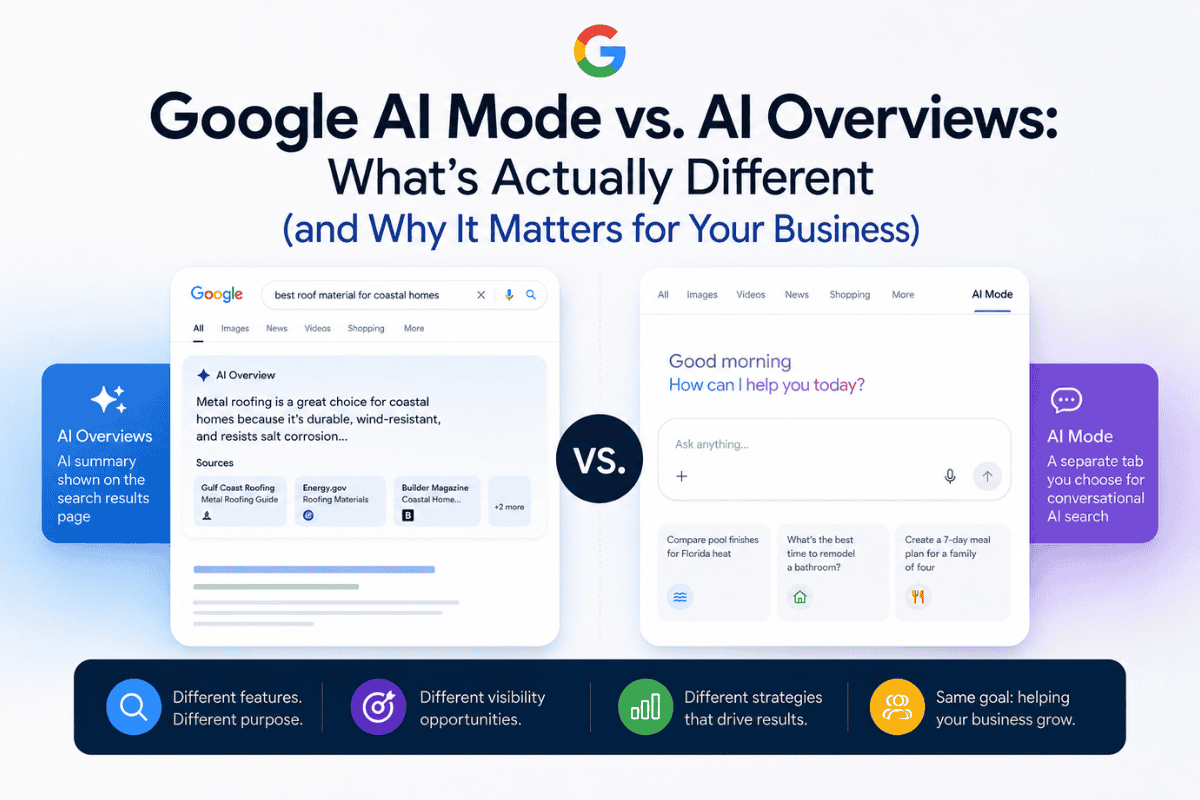
You Google your own business one afternoon and there it is: a gray box at the top of the results, summarizing everything a customer might want to know before they even scroll. A few days later, you search again. This time there’s a separate tab labeled “AI Mode.” You click it out of curiosity.
Now you’re typing follow-up questions into something that feels less like a search engine and more like a conversation. No list of blue links. No familiar layout. Just answers, and more questions you can ask.
If you’ve assumed these are the same feature wearing two different outfits, you’re not alone. They’re not the same thing, and the difference matters more than it might seem for how your business shows up when someone goes looking for what you offer.
Key takeaways
- AI Overviews appear automatically inside standard Google search results. You don’t opt in, and there’s no separate tab to click.
- AI Mode is a distinct interface you choose to enter. It skips the traditional list of ranked links entirely.
- Both features run on Google’s Gemini models and use a technique called query fan-out to build their answers.
- AI Mode’s version of fan-out goes deeper, which is part of why its answers tend to be longer and pull from a wider set of sources.
- Since a January 2026 update, Google has started connecting the two. A follow-up question on an AI Overview can carry you straight into an AI Mode conversation.
- Each feature creates different visibility opportunities, so understanding both helps you prioritize where to focus your content.
- This is a fast-moving product area. The boundaries described here are accurate today, but they won’t necessarily stay fixed.
What AI Overviews actually is
Where it shows up on the page
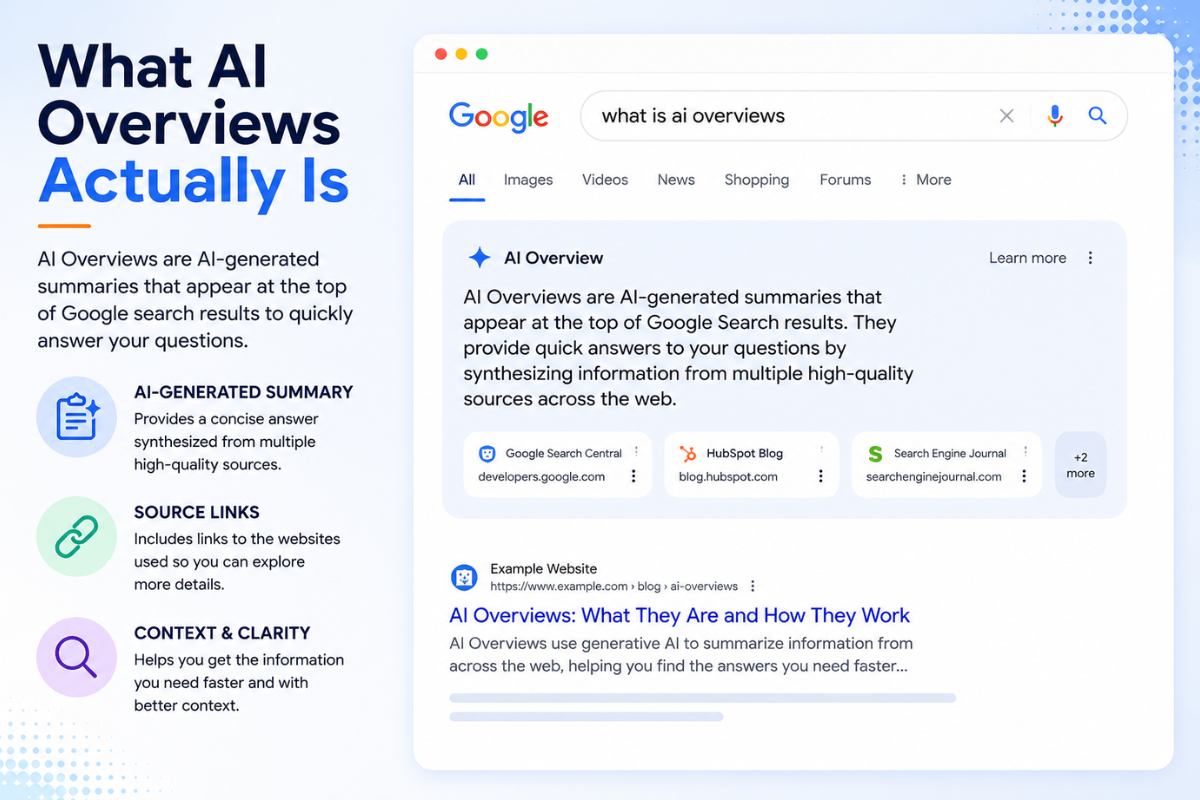
AI Overviews live inside the regular Google search results page. You search something, and if Google decides an AI-generated summary would help, one appears near the top, above the traditional list of ranked links.
It’s not a separate destination. You don’t navigate anywhere to see it. The summary sits directly in the flow of a search you were already running, with links to sources woven into the response itself.
For a small business, this matters because your traditional organic listing is still there, just potentially pushed further down the page. The AI Overview competes for the same attention your listing used to have largely to itself.
How it gets triggered (and why there’s no opt-in)
Google decides when an AI Overview appears based on the query itself. There’s no setting a business or a searcher can toggle to guarantee one shows up, and no way to guarantee one won’t.
Some searches trigger a full AI Overview. Others show only standard search results. The pattern isn’t always obvious from the outside, and it can shift as Google adjusts what it considers “worth summarizing.”
This is one of the more frustrating parts of the current search experience for business owners who like predictability. You can influence whether your content gets cited within an AI Overview. You can’t control whether one appears at all.
A quick timeline: from May 2024 to now
AI Overviews launched broadly in the United States in May 2024. Google has continued expanding availability since, and the feature is now live in more than 200 countries and over 40 languages.
That expansion tells you something worth sitting with: this isn’t a limited experiment anymore. It’s a standard part of how Google search works for most people, in most places, most of the time.
Which means if your business hasn’t yet thought about how it might get cited or summarized inside one of these boxes, that’s worth changing soon rather than later.
A restaurant owner searching “best happy hour deals near me” is a good example of how automatic and invisible the trigger can feel. One search pulls an AI Overview listing three or four spots with a line about each. A nearly identical search phrased slightly differently might return only the standard list of links, map pack included. There’s no dashboard telling a business owner which version their listing showed up in, or why.
What AI Mode actually is
A tab you choose, not a summary you’re shown
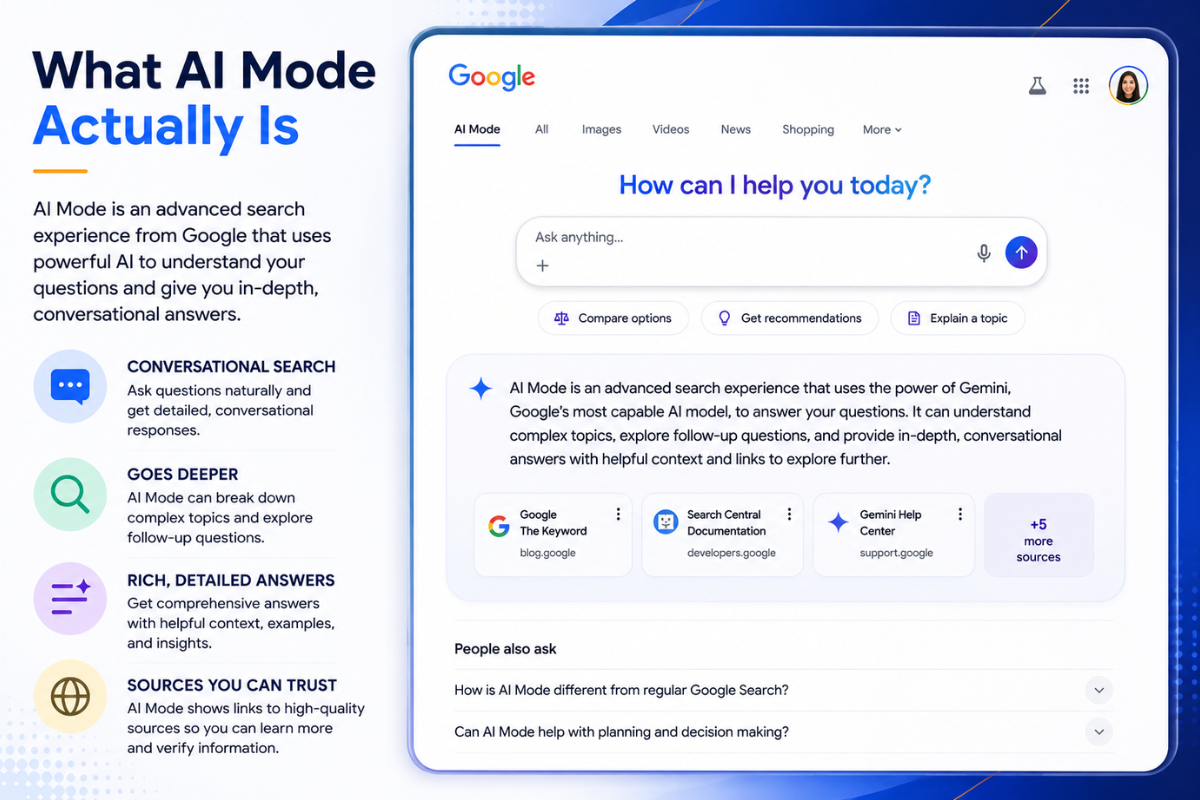
AI Mode is not something that appears in front of you automatically. It’s a dedicated interface, usually its own tab within Google Search or the Google app, that you have to actively enter.
That distinction sounds small. It isn’t. AI Overviews get pushed into your existing search. AI Mode is a destination you decide to visit, the way you’d choose to open a chat window instead of running a quick search.
Once you’re in AI Mode, the traditional list of ranked links disappears entirely. There’s no ten blue links, no map pack, no shopping carousel sitting alongside the answer. It’s a different search experience, not a decorated version of the old one.
Some users find AI Mode through Search Labs, Google’s testing ground for newer features, before it becomes a standard part of the search bar experience. Others land on it directly from the tab next to “All” and “Images” at the top of a regular results page. Either path leads to the same conversational search experience once you’re in it.
Why it feels more like a chatbot than a search engine
AI Mode supports follow-up questions. You can ask something, get an answer, then ask a second question that builds on the first, and the system remembers the context of your conversation.
That’s a meaningfully different interaction model than typing a query, scanning results, and starting a fresh search when you want more detail. It’s closer in feel to talking with an AI chatbot than to using a search engine, even though it’s still pulling from the web to build its answers.
For a business owner used to thinking about search purely in terms of rankings and click-through rates, this shift is worth taking seriously. A ranking on page one means very little inside an interface that doesn’t show rankings at all.
There’s also a practical difference in how long people stay. A traditional search session might last a few seconds before someone clicks away to a website. An AI Mode conversation can stretch across several exchanges, which changes what “engagement” even means for a business trying to get noticed.
A concrete example: searching for pool finishes in Florida heat
Picture a homeowner in South Florida typing “best pool finishes for Florida heat” into AI Mode. Instead of ten links to compare, they get a synthesized answer covering material options, heat tolerance, and maintenance tradeoffs, often with a follow-up prompt suggesting they ask about cost or installation timelines.
If a local pool builder’s content never gets pulled into that synthesized answer, the business is invisible in that moment, regardless of how well it ranks in traditional search. The homeowner might never see a single traditional listing at all before they’ve already formed an opinion about which finish to ask their contractor for.
How does Google AI Mode actually work under the hood?
What “query fan-out” means, in plain language
Both AI Overviews and AI Mode rely on something Google calls query fan-out. Instead of treating your search as a single question, the system breaks it into several related sub-questions, runs each one separately, and then combines what it finds into one response.
Think of it less like asking a single librarian a question and more like sending several researchers off with related but distinct questions, then having someone synthesize their findings into a single briefing. That’s a simplification, but it captures the basic idea.
This is also why AI-generated answers can pull from several sources at once and cite more than one page in a single response. The system isn’t reading one article and summarizing it. It’s assembling an answer from pieces gathered across multiple searches.
Say someone asks “should I repair or replace my roof after storm season.” Fan-out might quietly generate sub-questions like “average roof repair cost Florida,” “signs of storm damage requiring replacement,” and “how long do asphalt shingle roofs last in humid climates.” Each of those runs as its own retrieval process before the final answer gets assembled.
Why AI Mode’s fan-out goes further than an AI Overview’s
AI Mode’s version of query fan-out is more extensive than the one behind AI Overviews. It runs a broader set of sub-queries and evaluates a wider pool of sources before producing a response.
That’s the practical reason AI Mode answers tend to run longer and feel more thorough than an AI Overview covering the same general topic. More sub-queries generally means more raw material to synthesize from.
Exactly how many sub-queries AI Mode runs per search isn’t something Google has confirmed publicly in a way that’s easy to verify, so it’s not worth repeating a specific number here. What’s consistent across reporting is the direction: more sub-queries than an AI Overview, not a matching count.
The practical upshot for a business is this: an AI Mode answer has more chances to pull in a page that touches on some narrow piece of the broader question, even if that page was never written with the exact search phrase in mind.
What that means for the sources you’ll see cited
Because AI Mode casts a wider net, the set of sources it cites for a given topic won’t always match what an AI Overview cites for the same query. A page that gets picked up in one might not appear in the other at all.
This is part of why treating “getting cited in AI search” as one single goal misses something important. There are at least two different retrieval processes at work, and optimizing for one doesn’t guarantee results in the other.
Both are powered by Google’s Gemini models, which is worth knowing if only because it explains why the two features share a real family resemblance even while behaving so differently on the page and in the search bar.
The line between them is already blurring
The January 2026 update: from Overview to conversation
As of a January 2026 product update, Google started deliberately connecting these two features instead of keeping them fully separate. If you tap “Show more” on an AI Overview, or ask a follow-up question directly from one, you can get carried straight into an AI Mode conversation.
Your original context comes with you. The system doesn’t treat your follow-up as a brand new search starting from zero.
This isn’t a formal merger with an announcement date attached to it. It’s more accurate to describe it as an ongoing blurring of the boundary between the two, something Google appears to be doing gradually rather than all at once.
In practice, this means a searcher might start with a narrow question, get a quick AI Overview answer, then realize they have three more questions and get routed into a full conversation without ever consciously deciding to “switch tools.” The transition happens inside a single search session.
Why Google is doing this
The logic isn’t hard to follow. AI Overviews handle quick, contained questions well. AI Mode handles the messier, multi-step questions people actually have once curiosity kicks in.
Connecting the two lets Google catch a searcher at the moment their question outgrows a short summary, without making them start over in a different tool entirely. That reduces the friction of having to retype context the person already gave once.
What “blurring” doesn’t mean yet
It doesn’t mean the two features have merged into one. AI Overviews still show up automatically inside standard search results. AI Mode still requires a deliberate choice to enter, at least for now.
What’s changed is that the wall between them has a door in it. That’s a meaningfully different thing than tearing the wall down. A business shouldn’t assume the two features have become interchangeable just because moving between them got easier.
Why this distinction matters for your business
Different features, different visibility opportunities
An AI Overview and an AI Mode response can pull from different sources for the same general topic. That means a business optimized for one doesn’t automatically show up in the other.
If you’ve been thinking about “AI search visibility” as a single target to hit, it’s worth adjusting that mental model. It’s closer to two overlapping but distinct targets, each with its own retrieval behavior underneath.
Content built for quick, factual clarity tends to serve AI Overviews well. Content that anticipates follow-up questions and covers a topic in more depth tends to serve AI Mode better, since its fan-out process is doing more digging in the first place.
A local example: an HVAC company cited in one, invisible in the other
Say a West Palm Beach HVAC company has a strong page explaining the signs a home air conditioner needs replacing. That page might get pulled into an AI Overview for a query like “signs my AC is dying,” because it directly and concisely answers a narrow question.
But if a homeowner instead asks AI Mode something broader, like “should I repair or replace my AC before hurricane season,” the conversational, multi-part nature of that question might pull from entirely different sources, ones that address cost comparisons, timing, and regional considerations the narrower page never touches.
Same business. Same general expertise. Two different outcomes, because the retrieval process behind each feature is answering a different kind of question.
Now imagine that same company also has a page comparing repair costs to replacement costs, written with actual price ranges and a decision checklist. That’s the kind of page more likely to surface inside the broader AI Mode conversation, precisely because it already anticipates the follow-up question a homeowner would ask next.
Why content built for one doesn’t automatically work for the other
This is the part that trips up a lot of small businesses. A page written to rank well in traditional search, heavy on keywords and light on depth, might satisfy an AI Overview’s need for a clean, quotable answer.
It’s less likely to satisfy AI Mode, which is synthesizing across a broader set of sub-questions and tends to reward content that actually anticipates what someone would ask next. Shallow content has fewer places to get pulled into that kind of synthesis.
A law firm’s page titled simply “Personal Injury Attorney West Palm Beach,” stuffed with the phrase but thin on actual guidance, is a reasonable candidate for a basic AI Overview citation. It’s a poor candidate for AI Mode, which is more likely to reward a page that walks through what to do in the first 48 hours after an accident, how settlements typically get calculated, and when it’s worth involving an attorney at all.
A chiropractor’s office offers a similar test case. A short page saying “We treat back pain” competes with hundreds of nearly identical pages across town, and an AI Overview has little to distinguish one from another. A page that explains the difference between acute and chronic back pain, when chiropractic care tends to help versus when it doesn’t, and what a first visit typically involves gives an AI Mode conversation something specific to draw from instead of generic reassurance.
What you can actually do about it
The fundamentals that already feed both features
Neither AI Overviews nor AI Mode invented a brand new set of best practices. Both draw on the same underlying signals that have mattered for years: clear, accurate content that directly answers a real question, structured in a way that’s easy to extract and cite.
Pages with a clean structure, specific answers near the top, and language that sounds like how people actually ask questions tend to perform better in both systems. That’s not a coincidence. Both are built to find and lift out exactly that kind of content.
If your site currently has thin service pages, vague claims, or content written primarily to satisfy old-school keyword density rather than answer a real question, that’s the first thing to fix, regardless of which AI feature you’re trying to show up in.
Where to prioritize your effort right now
Start with the questions your customers actually ask before they call or book. Not the keywords a tool suggests. The literal phrasing people use when they’re standing in their kitchen, worried about their AC, typing into their phone.
Write content that answers those questions directly and completely, including the follow-up questions a reasonable person would ask next. That second part matters more for AI Mode, since its fan-out process is actively looking for exactly that kind of depth.
Structured data helps too, though it’s a supporting signal rather than a guarantee. FAQPage schema, in particular, has shifted in purpose. It matters less for traditional Google rich results these days and more for making your content easier for AI platforms to parse and cite directly.
Internal linking still counts as a fundamental, even in an AI-driven search world. A page that connects clearly to related service pages and supporting content gives both AI Overviews and AI Mode more surrounding context to draw from, which can make the difference between a partial answer and a complete one.
For a dentist, that might mean building out a genuinely useful page on what to expect after a root canal, not just a service listing that says “Root Canals” with a phone number. For a roofing contractor, it might mean a page that walks through how insurance claims typically work after storm damage, since that’s the kind of multi-part question that tends to land someone in AI Mode rather than a quick AI Overview.
What not to chase
Here’s a stance worth stating plainly: most of the anxiety around AI Mode versus AI Overviews is really anxiety about chasing a moving target, when the more useful move is strengthening the fundamentals underneath both.
Trying to reverse-engineer the exact mechanics of query fan-out, or obsessing over which specific sources got cited in one AI Mode response last week, is a poor use of a small business’s limited time. Those mechanics will keep shifting. Strong, specific, well-structured content won’t stop being valuable no matter how the interface around it changes.
Realistic expectations: this isn’t a finished product
Today’s lines may not hold
Everything described in this article reflects how AI Overviews and AI Mode work right now. Google has already shown, with the January 2026 update, that it’s willing to adjust how these features relate to each other.
There’s no reason to assume the current boundary between “automatic summary” and “chosen conversation” stays exactly where it is today. Google has changed how these features look and behave multiple times since AI Overviews first launched in May 2024, and there’s no sign that pace is slowing down.
Treat this article as an accurate snapshot, not a permanent map. What’s true about how AI Mode integrates with other Google products, or how it’s accessed, could look different within a year.
What to watch for, without guessing at numbers
It’s tempting to want a specific number to hold onto: exactly how many users AI Mode has, exactly how many sub-queries it runs, exactly when a formal merger might happen. Resist that temptation when the number isn’t independently confirmed.
What’s more useful is watching the direction of change. Google has been steadily connecting these features rather than keeping them siloed, and steadily expanding where and how AI-generated answers appear across search. That trend is worth tracking. The exact figures attached to it, less so, since they tend to shift before the ink dries.
If your business depends on local search visibility, treat this as an ongoing part of your marketing, not a one-time fix. What works today is a snapshot, not a settled strategy.
The safest bet is building a habit of checking in on this every quarter or so, rather than treating today’s understanding of AI Overviews and AI Mode as something to set once and forget. A twenty-minute check-in, a few sample searches related to your business, tells you more than any single article can promise to.
Not sure how your business shows up in AI search results?
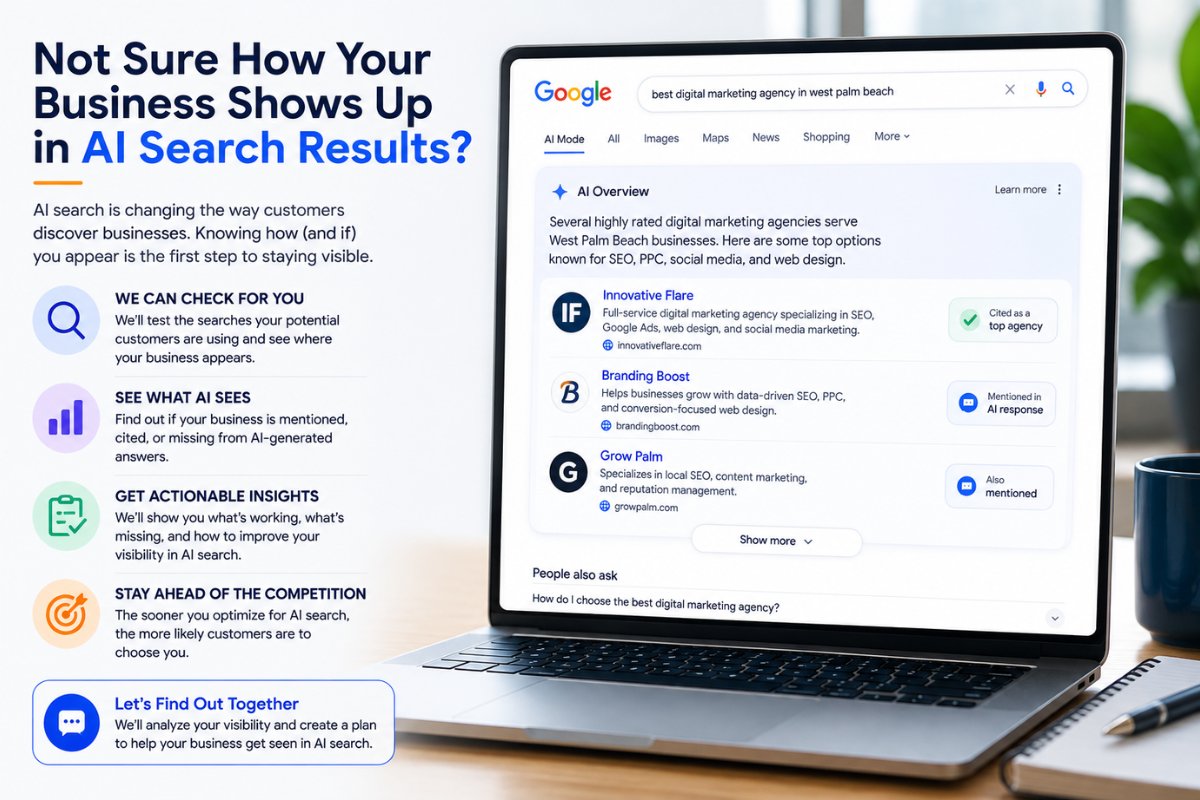
Between AI Overviews summarizing your competitors and AI Mode having entire conversations with your potential customers, it’s genuinely hard to know where your business currently stands. Most small businesses have never checked.
Innovative Flare works with small and mid-sized businesses across West Palm Beach and beyond to build content that’s structured for both traditional search and the AI-powered search experience customers are actually using now. That means clear service pages, question-driven content, and structured data that gives AI systems something worth citing.
Schedule a call with Innovative Flare to find out where your business currently shows up in AI search results, and where it doesn’t yet.
Google AI Mode and AI Overviews: frequently asked questions
What’s the difference between Google AI Mode and AI Overviews?
AI Overviews are AI-generated summaries that appear automatically inside standard Google search results, above the traditional list of links. AI Mode is a separate, dedicated interface that a user chooses to enter, replacing the ranked list of links with a conversational, chat-style experience that supports follow-up questions.
Do I need a Google account to use AI Mode?
AI Mode is generally accessible without requiring a signed-in Google account, though some personalized features and integrations with other Google services may work differently depending on whether you're signed in. Specific account requirements can change, so it's worth checking Google's own current documentation for the latest details.
Will AI Mode replace regular Google search?
There's no indication that AI Mode is set to replace traditional Google search outright. As of now, AI Mode exists alongside standard search results and AI Overviews as a distinct option, not a full replacement for the ranked list of links most people are used to.
Why do I sometimes see an AI summary and sometimes a chat tab?
AI Overviews appear automatically when Google's system determines a query would benefit from a summarized answer. AI Mode only appears when you actively navigate to it, either by tapping a dedicated tab or by following up on an AI Overview response, which can carry you into an AI Mode conversation since a January 2026 update.
What is query fan-out in Google search?
Query fan-out is the process both AI Overviews and AI Mode use to build their answers. Instead of treating a search as one single question, the system breaks it into several related sub-questions, retrieves information for each one separately, and combines the results into a single synthesized response.
Can a business get cited in AI Mode the same way as AI Overviews?
Not automatically. AI Mode's fan-out process is more extensive than an AI Overview's, which means it often pulls from a different, broader set of sources for the same general topic. Content optimized for one doesn't guarantee visibility in the other.
Is AI Mode the same as ChatGPT or Perplexity?
AI Mode shares some similarities with AI chatbots like ChatGPT or search-focused tools like Perplexity, particularly the conversational, follow-up-friendly format. But AI Mode is built directly into Google Search, runs on Google's Gemini models, and pulls from Google's own search index rather than operating as a fully separate product.
How do I access Google AI Mode?
AI Mode typically appears as a tab within Google Search results, alongside options like "All" and "Images," or within the Google app's search bar. Availability can vary by region and account, so if you don't see it yet, it may not have rolled out to your location or device.
Does AI Mode use the same information as regular Google search results?
AI Mode draws from Google's search index, similar to traditional search results, but processes that information differently through its more extensive query fan-out. The sources it surfaces and cites in a given response won't always match what appears in standard, traditional search results for the same query.